Video Demo:
Basically a Flatlist is a view of group that illustrates the data in a horizontal or vertical scrollable view. In react native Listview is deprecated, so most of the time FlatList is used in react. FlatList is similar as ListView. In this tutorial we are going to learn how add the Horizontal FlatList in react native. DOWNLOAD SOURCE CODE FROM BELOW.
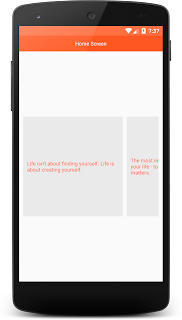


STEPS TO CREATE A REACT NATIVE PROJECT:
Step 1-> To create your project run this command:
Step 2->
Now initialise your project name. Replace your project name with MovingScreen:
Now you can start work on your React native project
HomeScreen.js
DOWNLOAD SOURCE CODE FROM HERE
Basically a Flatlist is a view of group that illustrates the data in a horizontal or vertical scrollable view. In react native Listview is deprecated, so most of the time FlatList is used in react. FlatList is similar as ListView. In this tutorial we are going to learn how add the Horizontal FlatList in react native. DOWNLOAD SOURCE CODE FROM BELOW.


STEPS TO CREATE A REACT NATIVE PROJECT:
Step 1-> To create your project run this command:
sudo npm install -g react-native-cliStep 2->
Now initialise your project name. Replace your project name with MovingScreen:
react-native init MovingScreen
Now you can start work on your React native project
HomeScreen.js
import React,{Component} from 'react'
import {View,Text,StyleSheet,StatusBar, FlatList,TouchableOpacity,Alert} from 'react-native'
export default class HomeScreen extends Component{ state ={ category:[ {name:"Life isn't about finding yourself. Life is about creating yourself."}, {name:"The most important thing is to enjoy your life - to be happy - it's all that matters."}, {name:"Life is really simple, but we insist on making it complicated."}, {name:"We all have two lives. The second one starts when we realize we only have one."}, { name:"When one door closes, another opens; but we often look so long and so regretfully upon the closed door that we do not see the one that has opened for us."} ] }
render(){ return ( <View style={styles.container}> <StatusBar backgroundColor='#FF7043'></StatusBar> <View style={styles.headerContainer}> <Text style={styles.headerTxt}>Home Screen</Text> </View>
<View style={styles.mainContainer}> <FlatList horizontal data={this.state.category} keyExtractor={(item,index)=> index.toString()} ItemSeparatorComponent={this.listDivider} renderItem={this.customListView.bind(this)}></FlatList> </View> </View> ) }
customListView(rowdata){ return ( <TouchableOpacity style={styles.listContainer} onPress={()=>this.listClick(rowdata)}> <View > <Text style={styles.listTxt}>{rowdata.item.name}</Text> </View> </TouchableOpacity> ) }
listDivider(){ return ( <View style={styles.dividerContainer}></View> ) }
listClick(rowdata){ Alert.alert(rowdata.item.name) } }
const styles = StyleSheet.create({ container:{ flex:1, },
headerContainer:{ height:40, backgroundColor:'#FF5722', width:'100%', justifyContent:'center', alignItems:'center' },
headerTxt:{ fontSize:13, color:'white' },
listContainer:{ width:250, height:250, padding:10, justifyContent:'center', alignItems:'center', alignSelf:'center', backgroundColor:'#EAEAEA' },
mainContainer:{ flex:1, padding:10, justifyContent:'center', alignItems:'center', alignSelf:'center', alignContent:'center', },
dividerContainer:{ width:10, height:1, },
listTxt:{ color:'#FF5722', fontSize:13, } })
export default class HomeScreen extends Component{ state ={ category:[ {name:"Life isn't about finding yourself. Life is about creating yourself."}, {name:"The most important thing is to enjoy your life - to be happy - it's all that matters."}, {name:"Life is really simple, but we insist on making it complicated."}, {name:"We all have two lives. The second one starts when we realize we only have one."}, { name:"When one door closes, another opens; but we often look so long and so regretfully upon the closed door that we do not see the one that has opened for us."} ] }
render(){ return ( <View style={styles.container}> <StatusBar backgroundColor='#FF7043'></StatusBar> <View style={styles.headerContainer}> <Text style={styles.headerTxt}>Home Screen</Text> </View>
<View style={styles.mainContainer}> <FlatList horizontal data={this.state.category} keyExtractor={(item,index)=> index.toString()} ItemSeparatorComponent={this.listDivider} renderItem={this.customListView.bind(this)}></FlatList> </View> </View> ) }
customListView(rowdata){ return ( <TouchableOpacity style={styles.listContainer} onPress={()=>this.listClick(rowdata)}> <View > <Text style={styles.listTxt}>{rowdata.item.name}</Text> </View> </TouchableOpacity> ) }
listDivider(){ return ( <View style={styles.dividerContainer}></View> ) }
listClick(rowdata){ Alert.alert(rowdata.item.name) } }
const styles = StyleSheet.create({ container:{ flex:1, },
headerContainer:{ height:40, backgroundColor:'#FF5722', width:'100%', justifyContent:'center', alignItems:'center' },
headerTxt:{ fontSize:13, color:'white' },
listContainer:{ width:250, height:250, padding:10, justifyContent:'center', alignItems:'center', alignSelf:'center', backgroundColor:'#EAEAEA' },
mainContainer:{ flex:1, padding:10, justifyContent:'center', alignItems:'center', alignSelf:'center', alignContent:'center', },
dividerContainer:{ width:10, height:1, },
listTxt:{ color:'#FF5722', fontSize:13, } })
DOWNLOAD SOURCE CODE FROM HERE


