Deepshikha Puri, the young Indian Entrepreneur heading the mobile development trade from years to successive extent, has worked with numerous clients and many tremendous brands in this industry of mobile encompassing in India and overseas maintaining promising work relationships with each of them with an impression to manage it's whole thing.

Saturday, March 3, 2018

Video Demo:


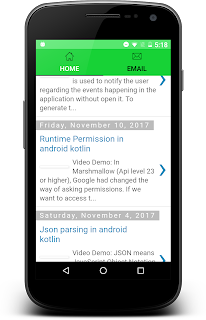
TabLayout provides a horizontal layout to display tabs. We can show the number of layout in single screen. In this tutorial, I am using the two fragments to shows the tab data. DOWNLOAD SOURCE CODE FROM BELOW:

tablayout in android kotlin
activity_main.xml:
<LinearLayout xmlns:android="http://schemas.android.com/apk/res/android    android:layout_width="match_parent"
    android:layout_height="match_parent"
    xmlns:app="http://schemas.android.com/apk/res-auto"
    android:orientation="vertical">

    <android.support.design.widget.TabLayout
        android:id="@+id/tb_fragments"
        android:layout_width="match_parent"
        android:layout_height="wrap_content"
        android:background="#17d236"
        app:tabIndicatorColor="#000000"
        app:tabSelectedTextColor="#ffffff"
        app:tabTextColor="#000000">

    </android.support.design.widget.TabLayout>

    <FrameLayout
        android:id="@+id/fl_container"
        android:layout_width="match_parent"
        android:layout_height="match_parent">

    </FrameLayout>

</LinearLayout>
MainActivity.kt:
package com.deepshikha.tablayoutkotlin

import android.support.v7.app.AppCompatActivity
import android.os.Bundle
import android.support.design.widget.TabLayout
import kotlinx.android.synthetic.main.activity_main.*

class MainActivity : AppCompatActivity() , TabLayout.OnTabSelectedListener {
    lateinit var homefragment:HomeFragment
    lateinit var contactfragment:ContactFragment

    override fun onCreate(savedInstanceState: Bundle?) {
        super.onCreate(savedInstanceState)
        setContentView(R.layout.activity_main)
        init()
    }

    private fun init() {
        supportActionBar!!.hide()

        homefragment= HomeFragment()
        contactfragment= ContactFragment()

        val firstTab = tb_fragments.newTab()
        firstTab.setText("Home")
        firstTab.setIcon(R.drawable.home)
        tb_fragments.addTab(firstTab)

        val secondTab = tb_fragments.newTab()
        secondTab.setText("Email")
        secondTab.setIcon(R.drawable.email)
        tb_fragments.addTab(secondTab)

        tb_fragments.setOnTabSelectedListener(this)

        supportFragmentManager
                .beginTransaction()
                .add(R.id.fl_container,homefragment)
                .commit()
    }

    override fun onTabReselected(tab: TabLayout.Tab?) {
    }

    override fun onTabUnselected(tab: TabLayout.Tab?) {

    }

    override fun onTabSelected(tab: TabLayout.Tab?) {
        when(tab!!.position){
            0-> {
                supportFragmentManager
                        .beginTransaction()
                        .replace(R.id.fl_container, homefragment)
                        .commit()
            }

            1-> {
                supportFragmentManager
                        .beginTransaction()
                        .replace(R.id.fl_container, contactfragment)
                        .commit()
            }

        }
    }

}

fragment_home.xml:

<?xml version="1.0" encoding="utf-8"?>
<LinearLayout xmlns:android="http://schemas.android.com/apk/res/android"
    android:layout_width="match_parent"
    android:layout_height="match_parent"
    android:orientation="vertical">
    
    <WebView
        android:layout_width="match_parent"
        android:layout_height="match_parent"
        android:id="@+id/webview"></WebView>

</LinearLayout>


HomeFragment.kt:
package com.deepshikha.tablayoutkotlin

import android.app.ProgressDialog
import android.os.Bundle
import android.support.v4.app.Fragment
import android.view.LayoutInflater
import android.view.View
import android.view.ViewGroup
import android.webkit.WebView
import android.webkit.WebViewClient

/**
 * Created by deepshikha on 2/2/18.
 */
public class HomeFragment : Fragment() {
    lateinit var view12: View
    var mywebview: WebView? = null
    lateinit var progressdialog: ProgressDialog
    override fun onCreateView(inflater: LayoutInflater, container: ViewGroup?, savedInstanceState: Bundle?): View? {

        view12 = inflater!!.inflate(R.layout.fragment_home, container, false)
        init()
        return view12
    }

    private fun init() {

        progressdialog = ProgressDialog.show(activity, "Please Wait", "Loading");
        mywebview = view12.findViewById(R.id.webview)
        mywebview!!.webViewClient = object : WebViewClient() {
            override fun shouldOverrideUrlLoading(view: WebView?, url: String?): Boolean {
                view?.loadUrl(url)
                return true
            }

            override fun onPageFinished(view: WebView?, url: String?) {
                super.onPageFinished(view, url)
                progressdialog.dismiss()
            }
        }
        mywebview!!.loadUrl("http://deepshikhapuri.blogspot.in/")


//        webview = view12.findViewById(R.id.webview) as WebView
//        val webSettings = webview.settings
//        webSettings.javaScriptEnabled = true
//
//        webview.loadUrl("http://deepshikhapuri.blogspot.in/")
//        webview.setweb

    }
}
fragment_contact.xml:
<?xml version="1.0" encoding="utf-8"?>
<RelativeLayout xmlns:android="http://schemas.android.com/apk/res/android"
    android:layout_width="match_parent"
    android:layout_height="match_parent"
    android:background="#ffffff"
    android:orientation="vertical">

    <TextView
        android:textColor="#000000"
        android:text="deepshikhapuri.here@gmail.com"
        android:layout_width="wrap_content"
        android:layout_height="wrap_content"
        android:layout_centerInParent="true"/>

</RelativeLayout>

ContactFragment.kt:
package com.deepshikha.tablayoutkotlin

import android.os.Bundle
import android.support.v4.app.Fragment
import android.view.LayoutInflater
import android.view.View
import android.view.ViewGroup

/**
 * Created by deepshikha on 2/2/18.
 */
public class ContactFragment:Fragment(){
    lateinit var view12: View

    override fun onCreateView(inflater: LayoutInflater, container: ViewGroup?, savedInstanceState: Bundle?): View? {
           view12 = inflater!!.inflate(R.layout.fragment_contact, container, false)
        return view12
    }
}

DOWNLOAD SOURCE CODE FROM HERE


Sunday, February 18, 2018

Video Demo:


TabLayout provides a horizontal layout to display tabs. We can show the number of layout in single screen. In this tutorial I am using the two fragments to shows the tab data. DOWNLOAD SOURCE CODE FROM BELOW:

android material design tabs

activity_main.xml:;LinearLayout xmlns:android="http://schemas.android.com/apk/res/android"
    xmlns:app="http://schemas.android.com/apk/res-auto"
    android:layout_width="match_parent"
    android:layout_height="match_parent"
    android:orientation="vertical">


    <android.support.design.widget.TabLayout
        android:id="@+id/tb_fragments"
        android:layout_width="match_parent"
        android:layout_height="wrap_content"
        android:background="#f96239"
        app:tabIndicatorColor="#000000"
        app:tabSelectedTextColor="#ffffff"
        app:tabTextColor="#000000">

    </android.support.design.widget.TabLayout>

    <FrameLayout
        android:id="@+id/fl_main"
        android:layout_width="match_parent"
        android:layout_height="match_parent" />


</LinearLayout>
MainActivity.javapackage com.deepshikha.tablayout;
package com.deepshikha.tablayout;

import android.support.design.widget.TabLayout;
import android.support.v4.app.Fragment;
import android.support.v4.app.FragmentManager;
import android.support.v4.app.FragmentTransaction;
import android.support.v7.app.AppCompatActivity;
import android.os.Bundle;
import android.view.Window;
import android.widget.FrameLayout;

public class MainActivity extends AppCompatActivity {
    TabLayout tb_fragments;
    FrameLayout fl_main;
    HomeFragment homeFragment;
    ContactFragment contactFragment;

    @Override
    protected void onCreate(Bundle savedInstanceState) {
        super.onCreate(savedInstanceState);
        requestWindowFeature(Window.FEATURE_NO_TITLE);
        setContentView(R.layout.activity_main);
        getSupportActionBar().hide();
        init();
    }

    private void init(){
        tb_fragments = (TabLayout)findViewById(R.id.tb_fragments);
        fl_main = (FrameLayout) findViewById(R.id.fl_main);

        TabLayout.Tab firstTab = tb_fragments.newTab();
        firstTab.setText("Home");
        firstTab.setIcon(R.drawable.home);
        tb_fragments.addTab(firstTab);

        TabLayout.Tab secondTab = tb_fragments.newTab();
        secondTab.setText("Email");
        secondTab.setIcon(R.drawable.email);
        tb_fragments.addTab(secondTab);

        homeFragment = new HomeFragment();
        contactFragment = new ContactFragment();

        FragmentManager fm = getSupportFragmentManager();
        FragmentTransaction ft = fm.beginTransaction();
        ft.add(R.id.fl_main, homeFragment);
        ft.setTransition(FragmentTransaction.TRANSIT_FRAGMENT_OPEN);
        ft.commit();

        tb_fragments.setOnTabSelectedListener(new TabLayout.OnTabSelectedListener() {
            @Override
            public void onTabSelected(TabLayout.Tab tab) {
                Fragment fragment = null;
                switch (tab.getPosition()) {
                    case 0:
                        fragment = homeFragment;
                        break;
                    case 1:
                        fragment = contactFragment;
                        break;

                }
                FragmentManager fm = getSupportFragmentManager();
                FragmentTransaction ft = fm.beginTransaction();
                ft.replace(R.id.fl_main, fragment);
                ft.setTransition(FragmentTransaction.TRANSIT_FRAGMENT_OPEN);
                ft.commit();
            }

            @Override
            public void onTabUnselected(TabLayout.Tab tab) {


            }

            @Override
            public void onTabReselected(TabLayout.Tab tab) {

            }
        });


    }
}
fragment_home.xml:
<?xml version="1.0" encoding="utf-8"?>
<RelativeLayout xmlns:android="http://schemas.android.com/apk/res/android"
    android:orientation="vertical" android:layout_width="match_parent"
    android:layout_height="match_parent">

    <WebView
        android:layout_width="match_parent"
        android:layout_height="match_parent"
        android:id="@+id/webview"></WebView>


</RelativeLayout>
HomeFragment.java:
package com.deepshikha.tablayout;

import android.app.ProgressDialog;
import android.os.Bundle;
import android.support.annotation.Nullable;
import android.support.v4.app.Fragment;
import android.util.Log;
import android.view.LayoutInflater;
import android.view.View;
import android.view.ViewGroup;
import android.webkit.WebChromeClient;
import android.webkit.WebSettings;
import android.webkit.WebView;
import android.webkit.WebViewClient;
import android.widget.ProgressBar;
import android.widget.Toast;

/**
 * Created by deepshikha on 2/2/18.
 */

public class HomeFragment extends Fragment {

    WebView webview;
    View view;

    @Nullable
    @Override
    public View onCreateView(LayoutInflater inflater, @Nullable ViewGroup container, Bundle savedInstanceState) {

        if (view==null) {
            view = inflater.inflate(R.layout.fragment_home, container, false);
            init();
        }
        return view;

    }

    private void init(){
        webview=(WebView)view.findViewById(R.id.webview);
        startWebView("http://deepshikhapuri.blogspot.in/");
    }

    private void startWebView(String url) {

        WebSettings settings = webview.getSettings();

        settings.setJavaScriptEnabled(true);
        webview.setScrollBarStyle(View.SCROLLBARS_OUTSIDE_OVERLAY);

        webview.getSettings().setBuiltInZoomControls(true);
        webview.getSettings().setUseWideViewPort(true);
        webview.getSettings().setLoadWithOverviewMode(true);

        final  ProgressDialog progressDialog = new ProgressDialog(getActivity());
        progressDialog.setMessage("Loading...");
        progressDialog.setCancelable(false);
        progressDialog.show();

        webview.setWebViewClient(new WebViewClient() {
            @Override
            public boolean shouldOverrideUrlLoading(WebView view, String url) {
                view.loadUrl(url);
                return true;
            }

            @Override
            public void onPageFinished(WebView view, String url) {
                if (progressDialog.isShowing()) {
                    progressDialog.dismiss();
                }
            }

            @Override
            public void onReceivedError(WebView view, int errorCode, String description, String failingUrl) {
                Log.e("ERRROr",description);
                Toast.makeText(getActivity(), "Error:" + description, Toast.LENGTH_SHORT).show();

            }
        });
        webview.loadUrl(url);
    }

}
fragment_contactus.xml:

<?xml version="1.0" encoding="utf-8"?>
<RelativeLayout xmlns:android="http://schemas.android.com/apk/res/android"
    android:layout_width="match_parent"
    android:layout_height="match_parent"
    android:background="#ffffff"
    android:orientation="vertical">

    <TextView
        android:layout_width="wrap_content"
        android:layout_height="40dp"
        android:textColor="#000000"
        android:gravity="center"
        android:padding="10dp"
        android:layout_centerInParent="true"
        android:text="deepshikhapuri.here@gmail.com"/>

</RelativeLayout>
ContactFragment.java:
package com.deepshikha.tablayout;

import android.os.Bundle;
import android.support.annotation.Nullable;
import android.support.v4.app.Fragment;
import android.view.LayoutInflater;
import android.view.View;
import android.view.ViewGroup;

/**
 * Created by deepshikha on 2/2/18.
 */

public class ContactFragment extends Fragment {

    View view;

    @Nullable
    @Override
    public View onCreateView(LayoutInflater inflater, @Nullable ViewGroup container, @Nullable Bundle savedInstanceState) {
        view=inflater.inflate(R.layout.fragment_contactus,container,false);
        return view;

    }
}

DOWNLOAD SOURCE CODE FROM HERE

Sunday, February 11, 2018

Video Demo:


In this tutorial, I am creating a demo of expandable listview with search bar. Expandable listview is used to show the data according to particular category. You can expand or collapse the data of particular group. To search the data I am using the TextWatcher. DOWNLOAD SOURCE CODE FROM BELOW
android expandablelistview search filter example

activity_main.xml:
<RelativeLayout xmlns:android="http://schemas.android.com/apk/res/android"
    android:layout_width="match_parent"
    android:layout_height="match_parent">
    <TextView
        android:id="@+id/rl_header"
        android:layout_width="match_parent"
        android:layout_height="20dp"
        android:background="#067b16"
        android:gravity="center"
        android:textColor="#ffffff">
    </TextView>
    <RelativeLayout
        android:id="@+id/rl_search"
        android:layout_width="match_parent"
        android:layout_height="60dp"
        android:layout_below="@+id/rl_header"
        android:background="#EFEFF4">
        <EditText
            android:id="@+id/et_search"
            android:layout_width="match_parent"
            android:layout_height="40dp"
            android:layout_centerInParent="true"
            android:layout_marginLeft="10dp"
            android:layout_marginRight="10dp"
            android:background="@drawable/drawable_search"
            android:drawableLeft="@android:drawable/ic_menu_search"
            android:drawablePadding="10dp"
            android:hint="Search"
            android:paddingLeft="10dp"
            android:paddingRight="10dp" />
    </RelativeLayout>
    <ExpandableListView
        android:id="@+id/ev_list"
        android:layout_width="match_parent"
        android:layout_height="match_parent"
        android:layout_below="@+id/rl_search">
    </ExpandableListView>
</RelativeLayout>
MainActivity.java:
 package com.deepshikha.expandablelistviewsearch;

import android.os.Bundle;
import android.support.annotation.Nullable;
import android.support.v7.app.AppCompatActivity;
import android.text.Editable;
import android.text.TextWatcher;
import android.view.View;
import android.view.Window;
import android.view.WindowManager;
import android.widget.EditText;
import android.widget.ExpandableListView;
import android.widget.ListView;

import java.util.ArrayList;
import java.util.HashMap;
import java.util.List;

/**
 * Created by deepshikha Puri on 16/1/18.
 */

public class MainActivity extends AppCompatActivity {
    ExpandableListView ev_list;
    List> lv_country = new ArrayList<>();
    CustomAdapter customAdapter;
    EditText et_search;

    @Override
    protected void onCreate(@Nullable Bundle savedInstanceState) {
        super.onCreate(savedInstanceState);
        requestWindowFeature(Window.FEATURE_NO_TITLE);
        getWindow().setFlags(WindowManager.LayoutParams.FLAG_FULLSCREEN, WindowManager.LayoutParams.FLAG_FULLSCREEN);

        setContentView(R.layout.activity_main);
        getSupportActionBar().hide();
        init();

    }

    private void init() {
        ev_list = (ExpandableListView) findViewById(R.id.ev_list);
        et_search = (EditText) findViewById(R.id.et_search);

        fn_arraylist();
        customAdapter = new CustomAdapter(lv_country, getApplicationContext());
        ev_list.setAdapter(customAdapter);

        ev_list.setOnGroupClickListener(new ExpandableListView.OnGroupClickListener() {
            @Override
            public boolean onGroupClick(ExpandableListView parent, View v, int groupPosition, long id) {
                return true; // This way the expander cannot be collapsed
            }
        });

        for (int i = 0; i < customAdapter.getGroupCount(); i++) {
            ev_list.expandGroup(i);
        }


        et_search.addTextChangedListener(new TextWatcher() {
            @Override
            public void beforeTextChanged(CharSequence charSequence, int i, int i1, int i2) {

            }

            @Override
            public void onTextChanged(CharSequence charSequence, int i, int i1, int i2) {

            }

            @Override
            public void afterTextChanged(Editable editable) {

                if (et_search.getText().toString().length() == 0) {
                    customAdapter = new CustomAdapter(lv_country, getApplicationContext());
                    ev_list.setAdapter(customAdapter);

                    for (int i = 0; i < customAdapter.getGroupCount(); i++) {
                        ev_list.expandGroup(i);
                    }
                } else {

                    List> lv_search = new ArrayList<>();

                    for (int i = 0; i < lv_country.size(); i++) {
                        List> lv_searchstate = new ArrayList<>();

                        List> lv_state = (List>) lv_country.get(i).get("State");
                        for (int j = 0; j < lv_state.size(); j++) {
                            if (lv_state.get(j).get("Name").toString().toLowerCase().contains(et_search.getText().toString())) {
                                lv_searchstate.add(lv_state.get(j));
                            }
                        }

                        if (lv_searchstate.size() != 0) {
                            HashMap hashMap_search = new HashMap<>();
                            hashMap_search.put("Name", lv_country.get(i).get("Name").toString());
                            hashMap_search.put("State", lv_searchstate);

                            lv_search.add(hashMap_search);
                        }
                    }


                    customAdapter = new CustomAdapter(lv_search, getApplicationContext());
                    ev_list.setAdapter(customAdapter);

                    for (int i = 0; i < customAdapter.getGroupCount(); i++) {
                        ev_list.expandGroup(i);
                    }


                }

            }
        });


    }

    private void fn_arraylist() {
        /*Afghanistan*/
        HashMap hashMap_country = new HashMap<>();
        hashMap_country.put("Name", "Afghanistan");

        List> lv_state = new ArrayList<>();
        HashMap hashMap_state = new HashMap<>();


        hashMap_state.put("Name", "Kabul");
        lv_state.add(hashMap_state);

        hashMap_state = new HashMap<>();
        hashMap_state.put("Name", "Kandahar");
        lv_state.add(hashMap_state);

        hashMap_state = new HashMap<>();
        hashMap_state.put("Name", "Herat");
        lv_state.add(hashMap_state);

        hashMap_state = new HashMap<>();
        hashMap_state.put("Name", "Mazar-i-Sharif");
        lv_state.add(hashMap_state);

        hashMap_state = new HashMap<>();
        hashMap_state.put("Name", "Kunduz");
        lv_state.add(hashMap_state);

        hashMap_state = new HashMap<>();
        hashMap_state.put("Name", "Jalalabad");
        lv_state.add(hashMap_state);

        hashMap_state = new HashMap<>();
        hashMap_state.put("Name", "Lashkar Gah");
        lv_state.add(hashMap_state);

        hashMap_state = new HashMap<>();
        hashMap_state.put("Name", "Taluqan");
        lv_state.add(hashMap_state);

        hashMap_state = new HashMap<>();
        hashMap_state.put("Name", "Puli Khumri");
        lv_state.add(hashMap_state);

        hashMap_state = new HashMap<>();
        hashMap_state.put("Name", "Khost");
        lv_state.add(hashMap_state);

        hashMap_state = new HashMap<>();
        hashMap_state.put("Name", "Ghazni");
        lv_state.add(hashMap_state);

        hashMap_state = new HashMap<>();
        hashMap_state.put("Name", "Sheberghan");
        lv_state.add(hashMap_state);

        hashMap_state = new HashMap<>();
        hashMap_state.put("Name", "Sari Pul ");
        lv_state.add(hashMap_state);

        hashMap_state = new HashMap<>();
        hashMap_country.put("State", lv_state);

        lv_country.add(hashMap_country);

        /*India*/
        hashMap_country = new HashMap<>();
        hashMap_country.put("Name", "India");

        lv_state = new ArrayList<>();
        hashMap_state = new HashMap<>();
        hashMap_state.put("Name", "Arunachal Pradesh");
        lv_state.add(hashMap_state);

        hashMap_state = new HashMap<>();
        hashMap_state.put("Name", "Assam");
        lv_state.add(hashMap_state);

        hashMap_state = new HashMap<>();
        hashMap_state.put("Name", "Bihar");
        lv_state.add(hashMap_state);

        hashMap_state = new HashMap<>();
        hashMap_state.put("Name", "Chandigarh");
        lv_state.add(hashMap_state);

        hashMap_state = new HashMap<>();
        hashMap_state.put("Name", "Chhattisgarh");
        lv_state.add(hashMap_state);

        hashMap_state = new HashMap<>();
        hashMap_state.put("Name", "Goa");
        lv_state.add(hashMap_state);

        hashMap_state = new HashMap<>();
        hashMap_state.put("Name", "Gujarat");
        lv_state.add(hashMap_state);

        hashMap_state = new HashMap<>();
        hashMap_state.put("Name", "Haryana");
        lv_state.add(hashMap_state);

        hashMap_state = new HashMap<>();
        hashMap_state.put("Name", "Himachal Pradesh");
        lv_state.add(hashMap_state);

        hashMap_state = new HashMap<>();
        hashMap_state.put("Name", "Jammu and Kashmir");
        lv_state.add(hashMap_state);

        hashMap_state = new HashMap<>();
        hashMap_state.put("Name", "Jharkhand");
        lv_state.add(hashMap_state);

        hashMap_state = new HashMap<>();
        hashMap_state.put("Name", "Maharashtra");
        lv_state.add(hashMap_state);

        hashMap_state = new HashMap<>();
        hashMap_state.put("Name", "Odisha");
        lv_state.add(hashMap_state);

        hashMap_state = new HashMap<>();
        hashMap_state.put("Name", "Punjab");
        lv_state.add(hashMap_state);

        hashMap_state = new HashMap<>();
        hashMap_state.put("Name", "Rajasthan");
        lv_state.add(hashMap_state);

        hashMap_state = new HashMap<>();
        hashMap_state.put("Name", "Sikkim");
        lv_state.add(hashMap_state);

        hashMap_state = new HashMap<>();
        hashMap_state.put("Name", "Uttarakhand");
        lv_state.add(hashMap_state);

        hashMap_state = new HashMap<>();
        hashMap_state.put("Name", "West Bengal");
        lv_state.add(hashMap_state);

        hashMap_state = new HashMap<>();

        hashMap_country.put("State", lv_state);
        lv_country.add(hashMap_country);

        /*America*/
        hashMap_country = new HashMap<>();
        hashMap_country.put("Name", "America");

        lv_state = new ArrayList<>();
        hashMap_state = new HashMap<>();

        hashMap_state.put("Name", "California");
        lv_state.add(hashMap_state);

        hashMap_state = new HashMap<>();
        hashMap_state.put("Name", "Texas");
        lv_state.add(hashMap_state);

        hashMap_state = new HashMap<>();
        hashMap_state.put("Name", "Hawaii");
        lv_state.add(hashMap_state);

        hashMap_state = new HashMap<>();
        hashMap_state.put("Name", "Florida");
        lv_state.add(hashMap_state);

        hashMap_state = new HashMap<>();
        hashMap_state.put("Name", "Alabama");
        lv_state.add(hashMap_state);

        hashMap_state = new HashMap<>();
        hashMap_state.put("Name", "Alaska");
        lv_state.add(hashMap_state);

        hashMap_state = new HashMap<>();
        hashMap_state.put("Name", "Pennsylvania");
        lv_state.add(hashMap_state);

        hashMap_state = new HashMap<>();
        hashMap_state.put("Name", "New Jersey");
        lv_state.add(hashMap_state);

        hashMap_state = new HashMap<>();
        hashMap_state.put("Name", "Minnesota");
        lv_state.add(hashMap_state);

        hashMap_state = new HashMap<>();
        hashMap_state.put("Name", "Georgia");
        lv_state.add(hashMap_state);

        hashMap_state = new HashMap<>();
        hashMap_state.put("Name", "Colorado");
        lv_state.add(hashMap_state);

        hashMap_state = new HashMap<>();
        hashMap_state.put("Name", "North Carolina");
        lv_state.add(hashMap_state);

        hashMap_state = new HashMap<>();
        hashMap_state.put("Name", "Indiana");
        lv_state.add(hashMap_state);

        hashMap_state = new HashMap<>();
        hashMap_state.put("Name", "New Mexico");
        lv_state.add(hashMap_state);

        hashMap_country.put("State", lv_state);
        lv_country.add(hashMap_country);

    }

}

adapter_child.xml:

<?xml version="1.0" encoding="utf-8"?>
<RelativeLayout xmlns:android="http://schemas.android.com/apk/res/android"
    android:layout_width="match_parent"
    android:layout_height="40dp"
    android:orientation="vertical">

    <TextView
        android:id="@+id/tv_child"
        android:layout_width="wrap_content"
        android:layout_height="40dp"
        android:layout_centerInParent="true"
        android:gravity="center"
        android:text="Child"
        android:textColor="#000000"
        android:textSize="15dp" />

    <View
        android:layout_width="match_parent"
        android:layout_height="1dp"
        android:layout_alignParentBottom="true"
        android:background="#000000">

    </View>

</RelativeLayout>
 adapter_header.xml:

<?xml version="1.0" encoding="utf-8"?>
<LinearLayout xmlns:android="http://schemas.android.com/apk/res/android"
    android:layout_width="match_parent"
    android:layout_height="50dp"
    android:orientation="vertical">

    <TextView
        android:id="@+id/tv_headername"
        android:layout_width="match_parent"
        android:textSize="15dp"
        android:layout_height="match_parent"
        android:background="#067b16"
        android:gravity="center_vertical"
        android:padding="10dp"
        android:text="Header"
        android:textColor="#FFFFFF" />

</LinearLayout>

CustomAdapter.java:

package com.deepshikha.expandablelistviewsearch;

import android.content.Context;
import android.view.LayoutInflater;
import android.view.View;
import android.view.ViewGroup;
import android.widget.BaseExpandableListAdapter;
import android.widget.TextView;

import java.util.HashMap;
import java.util.List;

/**
 * Created by deepshikha Puri on 16/1/18.
 */

public class CustomAdapter extends BaseExpandableListAdapter {
    List> lv_data;
    Context context;

    public CustomAdapter(List> lv_data, Context context) {
        this.lv_data = lv_data;
        this.context = context;
    }

    @Override
    public int getGroupCount() {
        return lv_data.size();
    }

    @Override
    public int getChildrenCount(int i) {

        List> lv_state = (List>) lv_data.get(i).get("State");
        return lv_state.size();
    }

    @Override
    public Object getGroup(int i) {
        return lv_data.get(i);
    }

    @Override
    public Object getChild(int i, int i1) {


        List> lv_state = (List>) lv_data.get(i).get("State");
        return lv_state.get(i1);
    }

    @Override
    public long getGroupId(int i) {
        return i;
    }

    @Override
    public long getChildId(int i, int i1) {
        return i1;
    }

    @Override
    public boolean hasStableIds() {
        return false;
    }

    @Override
    public View getGroupView(int i, boolean b, View convertView, ViewGroup viewGroup) {

        if (convertView == null) {
            LayoutInflater infalInflater = (LayoutInflater) this.context
                    .getSystemService(Context.LAYOUT_INFLATER_SERVICE);
            convertView = infalInflater.inflate(R.layout.adapter_header, null);
        }

        TextView tv_header = (TextView) convertView.findViewById(R.id.tv_headername);
        tv_header.setText(lv_data.get(i).get("Name").toString());
        return convertView;
    }

    @Override
    public View getChildView(int i, int i1, boolean b, View convertView, ViewGroup viewGroup) {

        if (convertView == null) {
            LayoutInflater inflater = (LayoutInflater) this.context.getSystemService(Context.LAYOUT_INFLATER_SERVICE);
            convertView = inflater.inflate(R.layout.adapter_child, null);
        }

        TextView tv_chid = (TextView) convertView.findViewById(R.id.tv_child);

        List> lv_state = (List>) lv_data.get(i).get("State");
        tv_chid.setText(lv_state.get(i1).get("Name").toString());

        return convertView;
    }

    @Override
    public boolean isChildSelectable(int i, int i1) {
        return false;
    }
}

DOWNLOAD SOURCE CODE FROM HERE

Saturday, January 27, 2018

Video Demo:


Navigation Drawer is used to display the sliding panel of android application. It is the most important part of the each application. Navigation drawer is not always in the open state. To see the Navigation drawer user need to click on menu option or slide to left. In this tutorial I am creating an application with Navigation drawer using kotlin Download source code from below.

                                               navigation drawer in kotlin

activity_main.xml:
<?xml version="1.0" encoding="utf-8"?>
<android.support.v4.widget.DrawerLayout xmlns:android="http://schemas.android.com/apk/res/android"
    xmlns:app="http://schemas.android.com/apk/res-auto"
    xmlns:tools="http://schemas.android.com/tools"
    android:id="@+id/drawer_layout"
    android:layout_width="match_parent"
    android:layout_height="match_parent"
    android:background="#ffffff"
    android:fitsSystemWindows="true"
    tools:openDrawer="start">

    <RelativeLayout
        android:id="@+id/rl_main"
        android:layout_width="match_parent"
        android:layout_height="match_parent">

        <RelativeLayout
            android:layout_width="match_parent"
            android:layout_height="50dp"
            android:background="@color/colorPrimary">

            <RelativeLayout
                android:id="@+id/rl_menu"
                android:layout_width="40dp"
                android:layout_height="match_parent">

                <ImageView
                    android:layout_width="25dp"
                    android:layout_height="25dp"
                    android:layout_centerVertical="true"
                    android:layout_marginLeft="10dp"
                    android:src="@drawable/menu4" />

            </RelativeLayout>

            <TextView
                android:id="@+id/tv_title"
                android:layout_width="wrap_content"
                android:layout_height="wrap_content"
                android:layout_centerInParent="true"
                android:text="Navigation drawer"
                android:textColor="#000000"
                android:textSize="15dp"
                android:textStyle="bold" />

        </RelativeLayout>

        <TextView
            android:id="@+id/tv_home"
            android:layout_width="wrap_content"
            android:layout_height="wrap_content"
            android:layout_centerInParent="true"
            android:textColor="#dc9e23"
            android:textSize="25dp"
            android:textStyle="bold" />

    </RelativeLayout>

    <!--Menu Options-->
    <LinearLayout
        android:layout_width="wrap_content"
        android:layout_height="match_parent"
        android:layout_gravity="start"
        android:background="#ffffff"
        android:orientation="vertical">

        <LinearLayout
            android:id="@+id/rl_header"
            android:layout_width="match_parent"
            android:layout_height="150dp"
            android:background="#dc9e23"
            android:orientation="vertical">

            <ImageView
                android:layout_width="100dp"
                android:layout_height="100dp"
                android:layout_gravity="center"
                android:src="@drawable/profile2" />

            <TextView

                android:layout_width="wrap_content"
                android:layout_height="wrap_content"
                android:layout_gravity="center"
                android:autoLink="web"
                android:paddingBottom="5dp"
                android:text="Deepshikha Puri"
                android:textColor="#000000"
                android:textSize="15dp" />

            <TextView
                android:id="@+id/tv_link"
                android:layout_width="wrap_content"
                android:layout_height="wrap_content"
                android:layout_gravity="center"
                android:autoLink="web"
                android:paddingBottom="5dp"
                android:text="deepshikhapuri.blogspot.in/"
                android:textColor="#000000"
                android:textSize="15dp"
                android:visibility="visible" />

        </LinearLayout>

        <LinearLayout
            android:id="@+id/ll_home"
            android:layout_width="match_parent"
            android:layout_height="50dp"
            android:orientation="horizontal">

            <ImageView
                android:layout_width="25dp"
                android:layout_height="25dp"
                android:layout_gravity="center_vertical"
                android:layout_marginLeft="10dp"
                android:src="@drawable/home" />

            <TextView
                android:layout_width="wrap_content"
                android:layout_height="wrap_content"
                android:layout_gravity="center"
                android:layout_marginLeft="20dp"
                android:text="Home"
                android:textColor="#000000"
                android:textSize="15dp" />
        </LinearLayout>

        <View
            android:layout_width="match_parent"
            android:layout_height="2dp"
            android:background="#eaeaea"></View>

        <LinearLayout
            android:id="@+id/ll_bookmark"
            android:layout_width="match_parent"
            android:layout_height="50dp"
            android:orientation="horizontal">

            <ImageView
                android:layout_width="25dp"
                android:layout_height="25dp"
                android:layout_gravity="center_vertical"
                android:layout_marginLeft="10dp"
                android:src="@drawable/bookmark" />

            <TextView
                android:layout_width="wrap_content"
                android:layout_height="wrap_content"
                android:layout_gravity="center"
                android:layout_marginLeft="20dp"
                android:text="Bookmark"
                android:textColor="#000000"
                android:textSize="15dp" />
        </LinearLayout>

        <View
            android:layout_width="match_parent"
            android:layout_height="2dp"
            android:background="#eaeaea"></View>

        <LinearLayout
            android:id="@+id/ll_help"
            android:layout_width="match_parent"
            android:layout_height="50dp"
            android:orientation="horizontal">

            <ImageView
                android:layout_width="25dp"
                android:layout_height="25dp"
                android:layout_gravity="center_vertical"
                android:layout_marginLeft="10dp"
                android:src="@drawable/help" />

            <TextView
                android:layout_width="wrap_content"
                android:layout_height="wrap_content"
                android:layout_gravity="center"
                android:layout_marginLeft="20dp"
                android:text="Help"
                android:textColor="#000000"
                android:textSize="15dp" />
        </LinearLayout>

        <View
            android:layout_width="match_parent"
            android:layout_height="2dp"
            android:background="#eaeaea"></View>

        <LinearLayout
            android:id="@+id/ll_about"
            android:layout_width="match_parent"
            android:layout_height="50dp"
            android:orientation="horizontal">

            <ImageView
                android:layout_width="25dp"
                android:layout_height="25dp"
                android:layout_gravity="center_vertical"
                android:layout_marginLeft="10dp"
                android:src="@drawable/about" />

            <TextView
                android:layout_width="wrap_content"
                android:layout_height="wrap_content"
                android:layout_gravity="center"
                android:layout_marginLeft="20dp"
                android:text="About"
                android:textColor="#000000"
                android:textSize="15dp" />
        </LinearLayout>

        <View
            android:layout_width="match_parent"
            android:layout_height="2dp"
            android:background="#eaeaea"></View>

    </LinearLayout>


</android.support.v4.widget.DrawerLayout>
MainActivity.kt:
package navigationdrawer.deepshikha.com.navigationdrawerkotlin

import android.graphics.Color
import android.os.Bundle
import android.support.v4.view.GravityCompat
import android.support.v7.app.AppCompatActivity
import android.text.method.LinkMovementMethod
import android.text.util.Linkify
import android.view.View
import kotlinx.android.synthetic.main.activity_main.*
import android.content.Intent
import android.net.Uri


class MainActivity : AppCompatActivity(), View.OnClickListener {


    override fun onCreate(savedInstanceState: Bundle?) {
        super.onCreate(savedInstanceState)
        setContentView(R.layout.activity_main)

        init()
    }

    private fun init() {
        tv_home.setText("Home Tab")
        tv_title.setText("Home")
        ll_about.setOnClickListener(this)
        ll_home.setOnClickListener(this)
        ll_bookmark.setOnClickListener(this)
        ll_help.setOnClickListener(this)
        rl_menu.setOnClickListener(this)
        rl_header.setOnClickListener(this)

        tv_link.setLinkTextColor(Color.parseColor("#000000"));
        Linkify.addLinks(tv_link, Linkify.ALL)

    }

    override fun onBackPressed() {
        if (drawer_layout.isDrawerOpen(GravityCompat.START)) {
            drawer_layout.closeDrawer(GravityCompat.START)
        } else {
            super.onBackPressed()
        }
    }


    override fun onClick(p0: View?) {
        when (p0?.id) {

            R.id.ll_home -> {
                drawer_layout.closeDrawer(GravityCompat.START)
                tv_home.setText("Home Tab")
                tv_title.setText("Home")


            }
            R.id.ll_about -> {

                val browserIntent = Intent(Intent.ACTION_VIEW, Uri.parse("http://deepshikhapuri.blogspot.in/"))
                startActivity(browserIntent)

            }

            R.id.ll_help -> {
                drawer_layout.closeDrawer(GravityCompat.START)
                tv_home.setText("Help Tab")
                tv_title.setText("Help")

            }

            R.id.ll_bookmark -> {
                drawer_layout.closeDrawer(GravityCompat.START)
                tv_home.setText("Bookmark Tab")
                tv_title.setText("Bookmark")

            }

            R.id.rl_header -> {
            }

            R.id.rl_menu -> {
                if (drawer_layout.isDrawerOpen(GravityCompat.START)) {
                    drawer_layout.closeDrawer(GravityCompat.START)
                } else {
                    drawer_layout.openDrawer(GravityCompat.START)
                }
            }


        }

    }

}


DOWNLOAD SOURCE CODE FROM HERE


Monday, January 15, 2018

Video Demo: 

Notification is used to notify the user regarding the events happening in the application without open it. To generate the notification in android we used NotificationBuilder  to generate the notification. PendingIntent  is used to mange the click on notification tray. So In tutorial I am showing to How to generate notification in android using kotlin.

Send Notification In Android  Using Kotlin


activity_main:
>RelativeLayout android:layout_width="match_parent"
    android:layout_height="match_parent"
    android:background="#ffffff"
    xmlns:android="http://schemas.android.com/apk/res/android">

    >TextView
        android:layout_width="wrap_content"
        android:layout_height="wrap_content"
        android:text="http://deepshikhapuri.blogspot.in/"
        android:textSize="18dp"
        android:id="@+id/tv_website"
        android:textColor="#0000FF"
        android:layout_marginTop="25dp"
        android:layout_centerHorizontal="true"/>

    >TextView
        android:layout_width="wrap_content"
        android:layout_height="wrap_content"
        android:text="Notification Tutorial"
        android:textSize="20dp"
        android:textStyle="bold"
        android:layout_below="@+id/tv_website"
        android:textColor="#000000"
        android:layout_marginTop="25dp"
        android:layout_centerHorizontal="true"/>

    >ImageView
        android:layout_width="match_parent"
        android:layout_height="250dp"
        android:layout_centerInParent="true"
        android:src="@drawable/android"/>
    >Button
        android:layout_width="match_parent"
        android:id="@+id/btn_notify"
        android:layout_alignParentBottom="true"
        android:layout_height="wrap_content"
        android:text="Send Notification"/>
>/RelativeLayout>

MainActivity.kt:
package com.deepshikha.notification

import android.app.NotificationManager
import android.app.PendingIntent
import android.content.Context
import android.content.Intent
import android.support.v7.app.AppCompatActivity
import android.os.Bundle
import android.support.v4.app.NotificationCompat
import android.view.View
import android.widget.Button
import android.widget.Toast
import kotlinx.android.synthetic.main.activity_main.*
import android.media.RingtoneManager
import android.text.method.LinkMovementMethod
import android.text.util.Linkify


class MainActivity : AppCompatActivity() {


    override fun onCreate(savedInstanceState: Bundle?) {
        super.onCreate(savedInstanceState)
        setContentView(R.layout.activity_main)


        Linkify.addLinks(tv_website, Linkify.ALL);
        btn_notify.setOnClickListener(object : View.OnClickListener {
            override fun onClick(v: View?) {
                val intent = Intent(applicationContext, MainActivity::class.java)
                intent.addFlags(Intent.FLAG_ACTIVITY_CLEAR_TOP)
                val pendingIntent = PendingIntent.getActivity(applicationContext, 0, intent, PendingIntent.FLAG_ONE_SHOT)
                val uri = RingtoneManager.getDefaultUri(RingtoneManager.TYPE_NOTIFICATION)

                val notificationBuilder = NotificationCompat.Builder(applicationContext)
                        .setContentText("Dummy Notification")
                        .setAutoCancel(true)
                        .setSound(uri)
                        .setSmallIcon(R.mipmap.ic_launcher)
                        .setContentIntent(pendingIntent)
                val notificationManager = getSystemService(Context.NOTIFICATION_SERVICE) as NotificationManager
                notificationManager.notify(0 /* ID of notification */, notificationBuilder.build())
            }
        })
    }
}

Friday, November 10, 2017

Video Demo:


In Marshmallow (Api level 23 or higher), Google had changed the way of asking permissions. If we want to access the camera, gallery etc of the marshmallow user, then we have to asked these permission during runtime otherwise over app should crash. There are two type of permission Normal Permission and Dangerous Permission

NORMAL PERMISSION- Normal permission in marshmallow is directly granted while installation of application. Examples of normal permission is given below:

<uses-permission android:name="android.permission.INTERNET"/>
<uses-permission android:name="android.permission.ACCESS_NETWORK_STATE"/>
<uses-permission android:name="android.permission.ACCESS_NOTIFICATION_POLICY"/>
<uses-permission android:name="android.permission.ACCESS_WIFI_STATE"/>
<uses-permission android:name="android.permission.BLUETOOTH"/>

DANGEROUS PERMISSION- Dangerous Permissions which provide access the personal data of user such as gallery, location, camera etc. Examples of dangerous permission is given below:

<uses-permission android:name="android.permission.READ_CALENDAR"/>
<uses-permission android:name="android.permission.WRITE_CALENDAR"/>
<uses-permission android:name="android.permission.WRITE_EXTERNAL_STORAGE"/>
<uses-permission android:name="android.permission.READ_EXTERNAL_STORAGE"/>
<uses-permission android:name="android.permission.READ_SMS"/>

In this tutorial I will cover the runtime permission in Marshmallow in android kotlin. DOWNLOAD SOURCE CODE FROM BELOW.


kotlin request permission

Add this dependency in your gradle:
compile 'io.vrinda.kotlinpermissions:kotlinpermissions:1.1'

AndroidManifest.xml:
<?xml version="1.0" encoding="utf-8"?>
<manifest xmlns:android="http://schemas.android.com/apk/res/android"
    package="deepshikha.com.runtimepermission">
    <uses-permission android:name="android.permission.CAMERA" />
    <uses-permission android:name="android.permission.READ_EXTERNAL_STORAGE" />
    <uses-permission android:name="android.permission.CALL_PHONE"/>
    <uses-permission android:name="android.permission.READ_SMS" />
    <uses-permission android:name="android.permission.READ_CONTACTS" />

    <application
        android:allowBackup="true"
        android:icon="@mipmap/ic_launcher"
        android:label="@string/app_name"
        android:roundIcon="@mipmap/ic_launcher_round"
        android:supportsRtl="true"
        android:theme="@style/AppTheme">
        <activity android:name=".MainActivity">
            <intent-filter>
                <action android:name="android.intent.action.MAIN" />
                <category android:name="android.intent.category.LAUNCHER" />
            </intent-filter>
        </activity>
    </application>

</manifest>

activity_main.xml:
<RelativeLayout xmlns:android="http://schemas.android.com/apk/res/android"
    android:layout_width="match_parent"
    android:background="#ffffff"
    android:layout_height="match_parent">

    <LinearLayout
        android:layout_width="match_parent"
        android:layout_height="match_parent"
        android:orientation="vertical"
        android:weightSum="2">


        <RelativeLayout
            android:layout_width="match_parent"
            android:layout_height="0dp"
            android:layout_weight="1">


            <LinearLayout
                android:layout_width="match_parent"
                android:layout_height="match_parent"
                android:orientation="horizontal"
                android:weightSum="2">

                <RelativeLayout
                    android:id="@+id/rl_camera"
                    android:layout_width="0dp"
                    android:layout_height="match_parent"
                    android:layout_weight="1">

                    <ImageView
                        android:layout_width="100dp"
                        android:id="@+id/iv_camera"
                        android:layout_marginTop="50dp"
                        android:layout_height="100dp"
                        android:layout_centerHorizontal="true"
                        android:src="@drawable/camera" />

                    <TextView
                        android:layout_width="wrap_content"
                        android:layout_marginTop="5dp"
                        android:layout_height="wrap_content"
                        android:layout_below="@+id/iv_camera"
                        android:layout_centerHorizontal="true"
                        android:text="Take Picture"
                        android:textColor="#000000"
                        android:textSize="18dp"
                        android:textStyle="bold"/>

                    <View
                        android:layout_width="match_parent"
                        android:layout_height="1dp"
                        android:layout_alignParentBottom="true"
                        android:background="#CDCDCD"></View>
                </RelativeLayout>


                <RelativeLayout
                    android:id="@+id/rl_gallery"
                    android:layout_width="0dp"
                    android:layout_height="match_parent"
                    android:layout_weight="1">

                    <ImageView
                        android:layout_width="100dp"
                        android:id="@+id/iv_gallery"
                        android:layout_marginTop="50dp"
                        android:layout_height="100dp"
                        android:layout_centerHorizontal="true"
                        android:src="@drawable/gallery" />

                    <TextView
                        android:layout_width="wrap_content"
                        android:layout_marginTop="5dp"
                        android:layout_height="wrap_content"
                        android:layout_below="@+id/iv_gallery"
                        android:layout_centerHorizontal="true"
                        android:text="Gallery Picture"
                        android:textColor="#000000"
                        android:textSize="18dp"
                        android:textStyle="bold"/>

                    <View
                        android:layout_width="match_parent"
                        android:layout_height="1dp"
                        android:layout_alignParentBottom="true"
                        android:background="#CDCDCD"> </View>
                </RelativeLayout>


            </LinearLayout>

            <View
                android:layout_width="match_parent"
                android:layout_height="1dp"
                android:layout_alignParentBottom="true"
                android:background="#EAEAEA"></View>


            <View
                android:layout_width="1dp"
                android:layout_height="match_parent"
                android:layout_centerHorizontal="true"
                android:background="#EAEAEA">&lt/View>


        </RelativeLayout>


        <!---->


        <RelativeLayout
            android:layout_width="match_parent"
            android:layout_height="0dp"
            android:layout_weight="1">


            <LinearLayout
                android:layout_width="match_parent"
                android:layout_height="match_parent"
                android:orientation="horizontal"
                android:weightSum="2">

                <RelativeLayout
                    android:id="@+id/rl_call"
                    android:layout_width="0dp"
                    android:layout_height="match_parent"
                    android:layout_weight="1">

                    <ImageView
                        android:layout_width="100dp"
                        android:id="@+id/iv_call"
                        android:layout_marginTop="50dp"
                        android:layout_height="100dp"
                        android:layout_centerHorizontal="true"
                        android:src="@drawable/call" />

                    <TextView
                        android:layout_width="wrap_content"
                        android:layout_marginTop="5dp"
                        android:layout_height="wrap_content"
                        android:layout_below="@+id/iv_call"
                        android:layout_centerHorizontal="true"
                        android:text="Call"
                        android:textColor="#000000"
                        android:textSize="18dp"
                        android:textStyle="bold"/>

                    <View
                        android:layout_width="match_parent"
                        android:layout_height="1dp"
                        android:layout_alignParentBottom="true"
                        android:background="#CDCDCD"></View>
                </RelativeLayout>


                <RelativeLayout
                    android:id="@+id/rl_contacts"
                    android:layout_width="0dp"
                    android:layout_height="match_parent"
                    android:layout_weight="1">

                    <ImageView
                        android:layout_width="100dp"
                        android:id="@+id/iv_contact"
                        android:layout_marginTop="50dp"
                        android:layout_height="100dp"
                        android:layout_centerHorizontal="true"
                        android:src="@drawable/contactlist" />

                    <TextView
                        android:layout_width="wrap_content"
                        android:layout_marginTop="5dp"
                        android:layout_height="wrap_content"
                        android:layout_below="@+id/iv_contact"
                        android:layout_centerHorizontal="true"
                        android:text="Contact"
                        android:textColor="#000000"
                        android:textSize="18dp"
                        android:textStyle="bold"/>

                    <View
                        android:layout_width="match_parent"
                        android:layout_height="1dp"
                        android:layout_alignParentBottom="true"
                        android:background="#CDCDCD"></View>
                </RelativeLayout>


            </LinearLayout>

            <View
                android:layout_width="match_parent"
                android:layout_height="1dp"
                android:layout_alignParentBottom="true"
                android:background="#EAEAEA"></View>


            <View
                android:layout_width="1dp"
                android:layout_height="match_parent"
                android:layout_centerHorizontal="true"
                android:background="#EAEAEA"></View>


        </RelativeLayout>


    </LinearLayout>


</RelativeLayout>
MainActivity.kt:
package deepshikha.com.runtimepermission

import android.Manifest
import android.annotation.SuppressLint
import android.content.Context
import android.content.Intent
import android.content.pm.PackageManager
import android.net.Uri
import android.os.Bundle
import android.provider.ContactsContract
import android.provider.MediaStore
import android.util.Log
import io.vrinda.kotlinpermissions.PermissionCallBack
import io.vrinda.kotlinpermissions.PermissionsActivity
import kotlinx.android.synthetic.main.activity_main.*


class MainActivity : PermissionsActivity() {
    var CAMERAMODE:Int=1
    var GALLERYMODE:Int=2
    var CALLMODE:Int=3
    var CONATACTMODE:Int=4
    var boolean_camera:Boolean=false
    var boolean_gallery:Boolean=false
    var boolean_call:Boolean=false
    var boolean_contact:Boolean=false


    override fun onCreate(savedInstanceState: Bundle?) {
        super.onCreate(savedInstanceState)
        setContentView(R.layout.activity_main)
        rl_camera.setOnClickListener {
            if (boolean_camera) {
                takePhoto()
            }else {
                fn_permission(Manifest.permission.CAMERA,CAMERAMODE)
            }
        }

        rl_gallery.setOnClickListener {
            if (boolean_gallery) {
                takegallerypicture()
            }else {
                fn_permission(Manifest.permission.READ_EXTERNAL_STORAGE,GALLERYMODE)
            }
        }

        rl_call.setOnClickListener {
            if (boolean_call) {
                phonecall()
            }else {
                fn_permission(Manifest.permission.CALL_PHONE,CALLMODE)
            }
        }


        rl_contacts.setOnClickListener {
            if (boolean_contact){
                readcontact()

            }else{
                fn_permission(Manifest.permission.READ_CONTACTS,CONATACTMODE)

            }

        }

    }

    fun fn_permission(permission:String,mode:Int){
        requestPermissions(permission, object : PermissionCallBack {
            override fun permissionGranted() {
                super.permissionGranted()
                Log.v("Call permissions", "Granted")

                if (mode==CAMERAMODE){
                    takePhoto()
                    boolean_camera=true
                }else if (mode==GALLERYMODE){
                    takegallerypicture()
                    boolean_gallery=true
                }else if (mode==CALLMODE){
                    phonecall()
                    boolean_call=true
                }else if (mode==CONATACTMODE){
                    readcontact()
                    boolean_contact=true
                }

            }

            override fun permissionDenied() {
                super.permissionDenied()
                Log.v("Call permissions", "Denied")

                if (mode==CAMERAMODE){
                    boolean_camera=false
                }else if (mode==GALLERYMODE){
                    boolean_camera=false
                }else if (mode==CALLMODE){
                    boolean_call=false
                }else if (mode==CONATACTMODE){
                    boolean_contact=false
                }

            }
        })
    }

    fun takePhoto() {
        val intent1 = Intent(MediaStore.ACTION_IMAGE_CAPTURE)
        if (intent1.resolveActivity(packageManager) != null) {
            startActivityForResult(intent1, CAMERAMODE)
        }
    }

    fun takegallerypicture() {
        val intent = Intent(Intent.ACTION_GET_CONTENT)
        intent.type = "image/*"
        if (intent.resolveActivity(packageManager) != null) {
            startActivityForResult(intent, GALLERYMODE)
        }
    }


    @SuppressLint("MissingPermission")
    fun phonecall() {
        val intent = Intent(Intent.ACTION_CALL);
        intent.data = Uri.parse("tel:1234567890s")
        startActivity(intent)
    }


    fun readcontact(){
        val intent = Intent(Intent.ACTION_PICK, ContactsContract.Contacts.CONTENT_URI)
        startActivity(intent)
    }
}


Saturday, October 14, 2017

Video Demo:


As we know that Viewpager is used to slide the screen. There are alots of tutorial of using viewpager in android programmatically with java, But there are limited example of using viewpager with kotlin. So here I am showing tutorial of using Viewpager in android using kotlin. Download source code from here.

android kotlin viewpager example

activity_main.xml:
<RelativeLayout xmlns:android="http://schemas.android.com/apk/res/android"
    android:layout_width="match_parent"
    android:layout_height="match_parent"
    android:background="#FFFFFF">

    <android.support.v4.view.ViewPager
        android:id="@+id/viewpager"
        android:layout_width="match_parent"
        android:layout_margin="20dp"
        android:layout_height="match_parent"
        android:layout_centerInParent="true"></android.support.v4.view.ViewPager>
</RelativeLayout>


MainActivity.kt:
package com.deepshikha.viewpagerkotlin

import android.support.v7.app.AppCompatActivity
import android.os.Bundle
import android.support.v4.app.FragmentManager
import kotlinx.android.synthetic.main.activity_main.*

class MainActivity : AppCompatActivity() {

    override fun onCreate(savedInstanceState: Bundle?) {
        super.onCreate(savedInstanceState)
        setContentView(R.layout.activity_main)

        val obj_adapter : ViewPagerAdapter
        obj_adapter = ViewPagerAdapter(supportFragmentManager)
        viewpager.adapter=obj_adapter
    }
}

Model.kt:
package com.deepshikha.viewpagerkotlin

/**
 * Created by deepshikha on 11/9/17.
 */
public class Model{
    var str_name=""
    var str_des=""
    var str_color=""
    var int_image=0

    constructor(str_name: String, int_image: Int,str_color:String,str_des:String) {
        this.str_name = str_name
        this.int_image = int_image
        this.str_color=str_color
        this.str_des=str_des
    }
}
fragment_category.xml:
<?xml version="1.0" encoding="utf-8"?>
<LinearLayout xmlns:android="http://schemas.android.com/apk/res/android"
    android:layout_width="match_parent"
    android:layout_height="match_parent"
    android:background="#91ecbd"
    android:id="@+id/ll_main"
    android:orientation="vertical">

    <TextView
        android:id="@+id/tv_name"
        android:layout_width="match_parent"
        android:layout_height="wrap_content"
        android:layout_margin="10dp"
        android:gravity="center"
        android:text=""
        android:textColor="#000000"
        android:textSize="20dp"
        android:textStyle="bold" />

    <ImageView
        android:id="@+id/iv_image"
        android:scaleType="centerCrop"
        android:layout_width="match_parent"
        android:layout_height="250dp" />

    <TextView
        android:id="@+id/tv_des"
        android:layout_width="match_parent"
        android:layout_height="wrap_content"
        android:layout_margin="10dp"
        android:gravity="center"
        android:text=""
        android:textColor="#000000"
        android:textSize="15dp"
        android:textStyle="italic" />

</LinearLayout>
CategoryFragment.kt:
package com.deepshikha.viewpagerkotlin

import android.graphics.Color
import android.os.Bundle
import android.support.v4.app.Fragment
import android.view.LayoutInflater
import android.view.View
import android.view.ViewGroup
import android.widget.ImageView
import android.widget.LinearLayout
import android.widget.TextView

/**
 * Created by deepshikha on 12/9/17.
 */
public class CategoryFragment : Fragment() {
    val al_category = ArrayList()
    var int_position: Int = 0
    lateinit var iv_image12: ImageView
    lateinit var tv_des: TextView
    lateinit var tv_name: TextView
    lateinit var ll_main: LinearLayout
    lateinit var view12: View

    override fun onCreateView(inflater: LayoutInflater?, container: ViewGroup?, savedInstanceState: Bundle?): View? {
        // Inflate the layout for this fragment
         view12 = inflater!!.inflate(R.layout.fragment_category, container, false)


        fn_arraylist()
        init()

        return view12
    }

    public fun init() {

        iv_image12 = view12?.findViewById(R.id.iv_image) as ImageView
        tv_name = view12?.findViewById(R.id.tv_name) as TextView
        tv_des = view12?.findViewById(R.id.tv_des) as TextView
        ll_main = view12?.findViewById(R.id.ll_main) as LinearLayout

        int_position = arguments.getInt("position")
        iv_image12.setImageResource(al_category.get(int_position).int_image)
        tv_name.setText(al_category.get(int_position).str_name)
        tv_des.setText(al_category.get(int_position).str_des)
        ll_main.setBackgroundColor(Color.parseColor(al_category.get(int_position).str_color))
    }


    public fun fn_arraylist() {
        al_category.add(Model("BURJ KHALIFA", R.drawable.burjkhalifa, "#f9b994","The Burj Khalifa, known as the Burj Dubai before its inauguration, is a megatall skyscraper in Dubai, United Arab Emirates."))
        al_category.add(Model("Taj Mahal", R.drawable.tajmahal, "#bdf3f7","he Taj Mahal is an ivory-white marble mausoleum on the south bank of the Yamuna river in the Indian city of Agra. It was commissioned in 1632 by the Mughal emperor, Shah Jahan, to house the tomb of his favourite wife, Mumtaz Mahal."))
        al_category.add(Model("Sagrada Família", R.drawable.sagrada, "#91ecbd","The Basílica i Temple Expiatori de la Sagrada Família is a large unfinished Roman Catholic church in Barcelona, designed by Catalan architect Antoni Gaudí"))
    }
}